Frontend prompt instructions
OpenAI · OpenAI's frontend prompt gives concrete guardrails for context-aware, coherent interfaces.
Research archive · AI slop controls
Compare exact prompts, raw outputs and recorded settings for AI-generated websites, motion and images. The source map turns reported fixes into testable hypotheses. These first outputs are exploratory pilots; unavailable model controls and changed factors remain explicit.
This is a research record. It does not rank models or treat a planned run as executed.
11 references · 9 cases · 19 completed outputs
Evidence first
The compact list contains the original material used by the current cases. Open the annotations only when you need source-level context.
OpenAI · OpenAI's frontend prompt gives concrete guardrails for context-aware, coherent interfaces.
OpenAI · The guide links underspecified briefs to generic layouts and recommends real content, references, constraints, and restrained composition.
W3C WAI · WCAG 2.2 adds requirements around visible, unobscured focus and target sizing, grounding visual polish in usable interaction.
MDN · MDN documents the widely supported CSS preference for removing, reducing, or replacing non-essential motion.
web.dev · web.dev gives implementation-oriented guidance for honoring motion preference as part of ordinary frontend work.
OpenAI · OpenAI’s image API guide documents generation and image-editing controls as product capabilities rather than a universal aesthetic recipe.
Midjourney · Midjourney recommends concise, visually specific prompting and names subject, medium, environment, lighting, color, mood, and framing as useful dimensions.
arXiv · This paper studies prompt structures and failure modes for text-to-image systems, treating prompting as an interaction design problem.
Black Forest Labs · BFL’s maintained guidance proposes descriptive natural language, front-loaded priorities, and one-variable iterative refinement.
arXiv · The study examines how people revise prompts after seeing generations, including adaptation to a model’s preferences.
r/midjourney · A practitioner thread proposes checking weighting, raw mode, style references, and regional edits when an intended style is missed.
OpenAI’s image API guide documents generation and image-editing controls as product capabilities rather than a universal aesthetic recipe.
Intervention Record model, size, quality, input images, exact prompt, and every edit pass beside the output.
Caveat Provider documentation explains interfaces, not independent proof of visual quality or authorship.
OpenAI documents image inputs alongside generation, making visual references a first-class input to an iterative workflow.
Intervention Give each reference a named job: subject, layout, palette, material, or unacceptable pattern.
Caveat A reference can change multiple attributes at once; a result does not identify which attribute caused the change.
Midjourney recommends concise, visually specific prompting and names subject, medium, environment, lighting, color, mood, and framing as useful dimensions.
Intervention Write the brief as a shot card with only the two most important constraints marked as non-negotiable.
Caveat Conciseness is model-specific guidance, not proof that short prompts outperform detailed prompts elsewhere.
Style Reference separates visual feel from depicted content and exposes a style-weight control for testing influence.
Intervention Use style reference for palette, medium, texture, or lighting; place the desired subject and action in text.
Caveat Version changes can alter reference interpretation, so a reference code alone is not reproducible metadata.
The official repository distinguishes text-to-image, fill, structural conditioning, variation, and image-editing model variants with different licenses.
Intervention Choose an operation before prompting: generate, preserve structure, vary, or edit; record the exact model and license.
Caveat Open weights and permission for a particular commercial use are separate questions.
BFL’s maintained guidance proposes descriptive natural language, front-loaded priorities, and one-variable iterative refinement.
Intervention Put subject and action first, then context, lighting, material, and framing; alter one field per revision.
Caveat Claims about ideal length or lighting impact are provider recommendations, not general experimental findings.
BFL publishes model-family-specific prompting guidance, reinforcing that controls must be read against the actual selected model.
Intervention Attach a model-version field to every gallery card and prevent cross-model comparisons from masquerading as one experiment.
Caveat Documentation may change after capture; retain the URL and accessed date with the result.
This paper studies prompt structures and failure modes for text-to-image systems, treating prompting as an interaction design problem.
Intervention Expose prompt parts in the page UI so a reader can identify which creative decision each phrase encodes.
Caveat The work predates current image models; its design framing is useful, but model behavior must be re-tested.
The study examines how people revise prompts after seeing generations, including adaptation to a model’s preferences.
Intervention Show revision history and the author’s intent so viewers can distinguish learning from simply optimizing for a model’s default look.
Caveat It describes observed behavior; it does not declare one prompt style artistically better.
W3C explains that non-essential interaction-triggered motion must be disableable at WCAG AAA, because it can distract or cause physical symptoms.
Intervention Give every animation a declared information or feedback purpose and a reduced-motion alternative.
Caveat This criterion is Level AAA guidance; product conformance still needs an accessibility review in context.
MDN documents the widely supported CSS preference for removing, reducing, or replacing non-essential motion.
Intervention Treat reduced motion as a designed mode: retain state changes while replacing travel and scale with opacity or instant transitions.
Caveat The media query signals a preference; it does not decide which motion is meaningful in your interface.
web.dev gives implementation-oriented guidance for honoring motion preference as part of ordinary frontend work.
Intervention Make reduced-motion screenshots and interaction states part of every animation experiment’s published evidence.
Caveat Preference support does not validate an animation’s visual hierarchy, timing, or content relevance.
Motion documents React-oriented mechanisms for respecting reduced-motion preferences while keeping interaction feedback available.
Intervention Store a motion intent beside each component: orient, confirm, reveal, or decorate; only the first three have a default justification.
Caveat A library feature cannot substitute for deciding whether a transition helps the reader.
C2PA specifies signed provenance assertions for digital media so a viewer can inspect a record of origin and edits when it is present.
Intervention Publish a human-readable generation ledger even when a file carries credentials: prompt, model, settings, references, edits, and export date.
Caveat A provenance record describes declared history and integrity; it does not by itself establish factual truth or aesthetic value.
Content Credentials presents provenance information as inspectable context for media rather than a visual style marker.
Intervention Place a compact disclosure beside every public output and link to the complete experiment record.
Caveat Credentials can be missing or stripped in distribution; the page must remain understandable without them.
A community answer separates character, general image, and style-reference syntax, reflecting a practitioner distinction worth testing.
Intervention Label the intent of each reference before generation instead of treating all uploaded images as interchangeable.
Caveat This is a single community explanation and product syntax can change.
A practitioner thread proposes checking weighting, raw mode, style references, and regional edits when an intended style is missed.
Intervention Treat each proposed fix as a separate hypothesis; never stack weights, style mode, and reference changes in one diagnostic run.
Caveat Advice is anecdotal and tied to a specific product version and user’s goal.
A user reports a detailed object not being retained from a reference; replies frame reference influence as non-deterministic.
Intervention For critical geometry or product details, use a layout or edit workflow and inspect the exact feature at 100% before publishing.
Caveat One failure report does not quantify reliability across prompts, models, or reference types.
A community question about divergence from a reference is retained as a signal for a controlled reference-fidelity test.
Intervention Pre-register which reference attributes must survive before selecting an output.
Caveat Page retrieval was partial, so do not infer a general technique from its discussion.
A community reply suggests lowering stylization or using raw style to reduce default styling, a claim suitable for an A/B test.
Intervention Define the unwanted default tendency before changing a style control, then evaluate only that tendency first.
Caveat The claim is anecdotal and parameter semantics can shift between product releases.
A community reply distinguishes style-reference use from using a regular image prompt for content or composition.
Intervention Use a reference board with separate columns for content, composition, and visual treatment.
Caveat This is practitioner interpretation, not a guarantee of model behavior.
A question about reference-strength equivalents highlights that controls cannot be assumed portable between image systems.
Intervention Publish a control-mapping table with an explicit “no equivalent” state instead of inventing cross-tool parity.
Caveat Partial retrieval; the entry is a research lead, not evidence that any controls are equivalent.
A request for reproducing an image through references is a useful reminder to separate inspiration, controllable attributes, and prohibited copying.
Intervention Describe observable properties—layout, light direction, material, palette—rather than asking to copy a source image or artist.
Caveat Partial community page; it does not establish legal, ethical, or technical rules.
OpenAI's frontend prompt gives concrete guardrails for context-aware, coherent interfaces.
Intervention Supply audience and existing-system context; ask for a CSS color scan and coherent non-overlapping layout.
Caveat Provider guidance is a recipe, not evidence that a listed style is inherently bad.
The guide links underspecified briefs to generic layouts and recommends real content, references, constraints, and restrained composition.
Intervention Start with a mood board, define tokens and narrative, then use a single focal composition and test floating elements at breakpoints.
Caveat It targets a specific model family and presents practical advice rather than a controlled design study.
OpenAI recommends explicit responsibilities, concrete tool examples, a quality rubric, and validation for agentic work.
Intervention Ask the model to make an internal rubric, implement, inspect the rendered result, and report failed criteria.
Caveat A rubric can turn into another shared default unless its criteria arise from the product and audience.
The image guide treats UI previews as product artifacts: describe hierarchy, real elements, real copy, and concrete constraints.
Intervention Use an artifact specification with canvas, hierarchy, real text, and a prohibition on decorative clutter instead of a style-only request.
Caveat Image previews can communicate direction but are not responsive, accessible, or production implementation proof.
Anthropic advises direct, explicit instructions and warns that unguided frontend generation can converge on generic patterns.
Intervention State deliverable, audience, visual direction, exclusions, and review procedure as separate prompt sections.
Caveat Prompt specificity can improve adherence while still preserving a model's learned visual bias.
Anthropic describes predictable but visually unremarkable layouts as a self-evaluation problem and makes subjective quality gradable.
Intervention Turn visual taste into named, observable criteria and feed the agent screenshots rather than relying on code inspection alone.
Caveat A gradable harness only tests the criteria it encodes; it cannot certify originality or audience fit.
The official skill asks an agent to commit to an intentional visual direction instead of repeating generic defaults.
Intervention Require a written design-direction decision before implementation, including purpose, audience, constraints, and a memorable element.
Caveat The skill is guidance, not an independently validated anti-slop detector.
This community skill packages anti-patterns with typography, color, layout, motion, accessibility, and performance guidance.
Intervention Audit one surface at a time—type, palette, layout, motion, or content—rather than applying a single style blacklist.
Caveat Its pattern list is authored guidance, so test it against the product rather than treating it as universal law.
Unslop separates prevention from cleanup and routes rules by surface, including prose, UI copy, naming, code, and frontend work.
Intervention Record whether the run is preventive generation or audit-and-rewrite, then evaluate only the relevant surface rules.
Caveat The repository describes its own method; its claims of coverage are not external outcome evidence.
The project argues that a generic anti-slop skill can itself become a convergence source and proposes curation, tooling, and broad iteration.
Intervention Build a project-specific reference library and choose an aesthetic taxonomy before coding; expose parameters for iteration.
Caveat A curated library can still reproduce its curator's narrow taste or source rights constraints.
This prompt kit combines a style selector, exclusions, and execution guidance for AI-assisted frontend work.
Intervention Select one visual direction and one major visual moment, then test whether implementation decisions support that direction.
Caveat Universal prompts risk convergence when reused unchanged across unrelated products.
A maker shared one-shot prompt-to-design examples and explicitly left visible flaws as a demonstration of expected limitations.
Intervention Label one-shot output as a baseline rather than a finished result; capture a second pass separately.
Caveat One maker's self-report and examples cannot establish typical model behavior.
A practitioner proposes screenshot input and an explicit create-review loop after finding one-pass results insufficient.
Intervention Make the agent inspect a screenshot after each major change and require a stated next defect to fix.
Caveat The report does not provide a controlled comparison, so treat it as a workflow hypothesis.
The thread names repeated dark gradients, glass cards, glowing blobs, generic fonts, and excessive rounding as perceived tells.
Intervention Write a design intent first, then test targeted changes to color, radius, type, and density rather than merely inverting a checklist.
Caveat These are community aesthetic judgments and can overlap with valid, accessible design choices.
Participants argue both that outputs converge and that a widely shared anti-slop prompt could become the next uniform aesthetic.
Intervention Measure diversity across a batch and rotate references or constraints rather than installing a permanent universal style rule.
Caveat The argument is opinion, and visual difference alone does not show better usability or product fit.
Responses recommend supplying visual references, product flow, repository context, and sometimes a human-designed Figma starting point.
Intervention Separate art direction from implementation: provide a wireframe or reference first, then request code for that direction.
Caveat Copying a reference can create legal, accessibility, and differentiation problems; use it as direction, not a clone target.
Thread participants favor screenshot references and explicit visual goals over a generic request to build a website.
Intervention Ask the model to list what it extracts from each reference before implementation, then verify the result is not a literal clone.
Caveat Community comments are not evidence that a reference workflow generalizes across products or models.
A builder describes generating brand maps from business context, imagery, logos, and explicit visual rules before site generation.
Intervention Create a compact brand map with product facts, palette sources, type mood, interaction character, and forbidden imitations.
Caveat The reported engine outcome is an unverified individual claim and scraping can introduce incorrect or rights-limited source material.
This preprint analyzes how frictionless web vibe-coding can narrow design diversity and proposes productive friction as mitigation.
Intervention Insert explicit decision points: choose references, reject a default, justify hierarchy, and review renderings before accepting output.
Caveat It is a preprint and a sociotechnical risk analysis, not a completed large-scale causal experiment.
AesthetiQ argues layout systems need contextual aesthetic preferences and proposes preference alignment plus a layout-quality evaluation method.
Intervention Evaluate rendered layouts with declared criteria—hierarchy, balance, legibility, context fit—instead of only checking generated markup.
Caveat The paper's proposed MLLM evaluation is not a substitute for representative human usability testing.
This comment piece frames mass-produced generative imagery called AI slop as a form of aesthetic alienation.
Intervention Include authorship, intent, source provenance, and audience context in an evaluation, not only surface-level visual tells.
Caveat It is a conceptual comment piece; it does not provide a detector or a general causal test of audience response.
WCAG 2.2 adds requirements around visible, unobscured focus and target sizing, grounding visual polish in usable interaction.
Intervention Treat keyboard focus visibility and contrast as release checks for every generated visual variant.
Caveat Accessibility conformance does not decide whether a design is distinctive or aesthetically successful.
web.dev advises selective animation, user control, and reduced-motion support rather than decorative motion by default.
Intervention Give every animation a feedback or orientation purpose, implement prefers-reduced-motion, and avoid unattended infinite loops.
Caveat Reduced motion is an accessibility requirement; it does not by itself diagnose generic visual style.
NN/g describes visual hierarchy and a blur or squint test for detecting unintended emphasis and clutter.
Intervention Add a blurred-screenshot hierarchy review to the run log before evaluating cosmetic details.
Caveat Hierarchy tests reveal attention patterns, not whether a page is AI-made or suitable for every audience.
The post was indexed as a discussion of AI aesthetics and evaluation, but its page returned a 403 during this research pass.
Intervention Treat direct X posts as leads only until their full text and date can be independently captured.
Caveat Full text and context were unavailable from X, so it supplies no scored finding or intervention claim here.
No sources match this filter.
What is being compared
Each item is a stable, linked comparison case. Filter once to narrow both this index and the full case cards below.
The evidence record
A case is one card: both specimens, both exact prompts, the observed difference, and the limits of the comparison.
Web
How does the same repair-workshop brief change when exclusions or a concrete editorial direction are added?
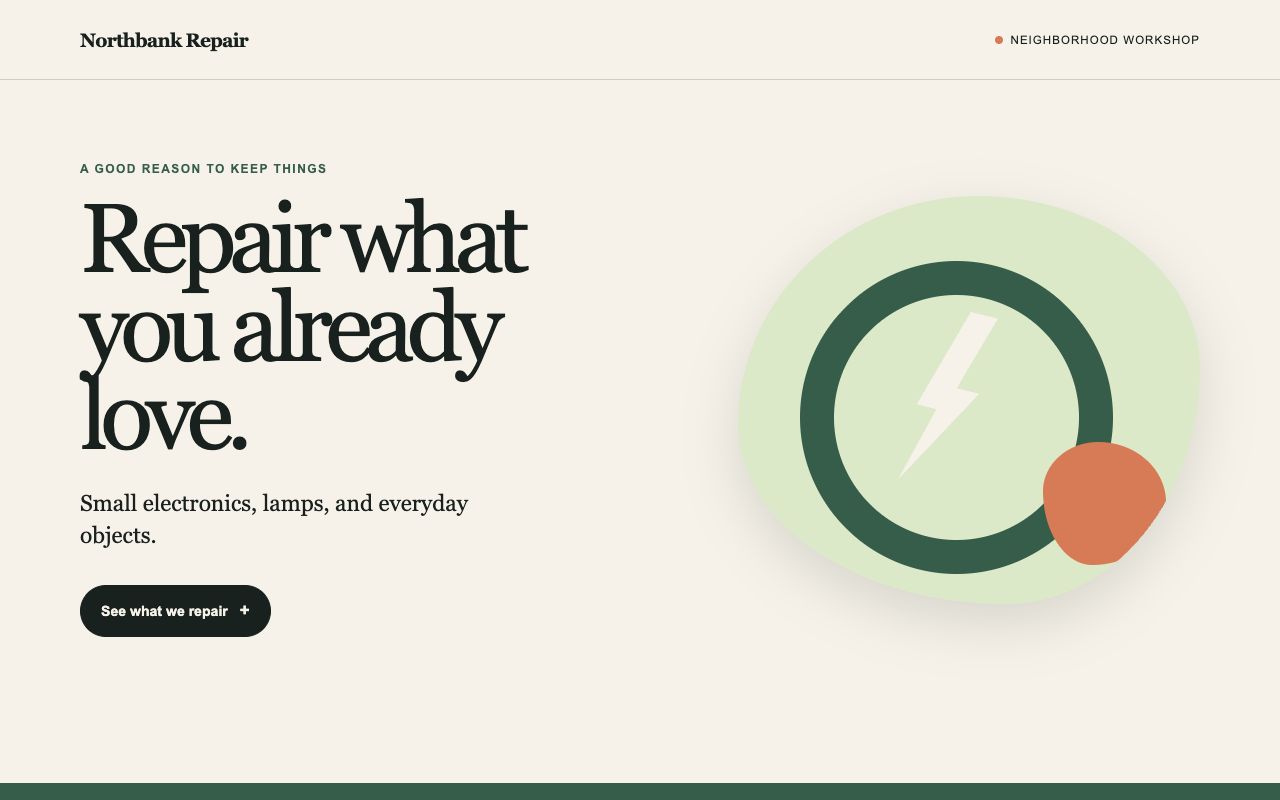
You are generating one raw AI Slop Lab experiment. You own ONLY [local output path redacted] You are not alone in the codebase. Do not revert or edit others' files. Generate the HTML from the task below in one pass. Use filesystem tools only to save this output. Do not browse, read unrelated files, install, run code, validate, revise, or optimize afterward. Preserve the first generated artifact. No additional files. Report completion with the path only.

Generate one complete, self-contained HTML document with inline CSS and JavaScript. Do not use external fonts, images, libraries, network requests, or inline event-handler attributes. Use semantic HTML, keyboard-operable controls, responsive layouts at 360 and 1280 pixels, visible focus, and prefers-reduced-motion support. All names and data below are fictional. Keep the same factual copy. Do not invent testimonials, metrics, awards, prices, or additional features. This is a visual prototype; label any unavailable action honestly.

Task: create a single-page site for Northbank Repair, a neighborhood repair workshop. Required copy: "Northbank Repair"; "Repair what you already love."; "Small electronics, lamps, and everyday objects."; "Saturday, 10:00–13:00"; "14 River Street"; "Bring one item. Diagnosis comes first." Include a clear "See what we repair" control revealing the three categories, a workshop schedule, and a short preparation checklist.
Visual direction: make it modern, polished, beautiful, and engaging.
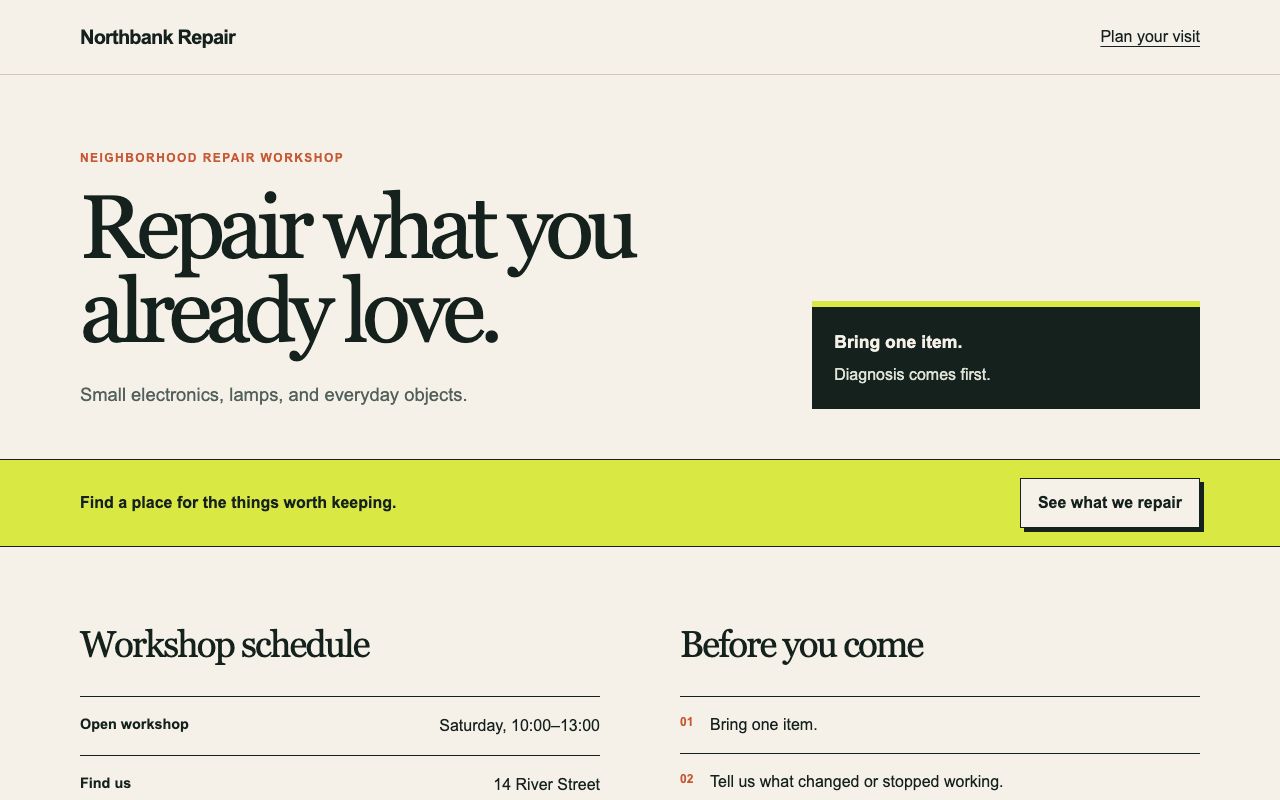
You are generating one raw AI Slop Lab experiment. You own ONLY [local output path redacted] You are not alone in the codebase. Do not revert or edit others' files. Generate the HTML from the task below in one pass. Use filesystem tools only to save this output. Do not browse, read unrelated files, install, run code, validate, revise, or optimize afterward. Preserve the first generated artifact. No additional files. Report completion with the path only.

Generate one complete, self-contained HTML document with inline CSS and JavaScript. Do not use external fonts, images, libraries, network requests, or inline event-handler attributes. Use semantic HTML, keyboard-operable controls, responsive layouts at 360 and 1280 pixels, visible focus, and prefers-reduced-motion support. All names and data below are fictional. Keep the same factual copy. Do not invent testimonials, metrics, awards, prices, or additional features. This is a visual prototype; label any unavailable action honestly.

Task: create a single-page site for Northbank Repair, a neighborhood repair workshop. Required copy: "Northbank Repair"; "Repair what you already love."; "Small electronics, lamps, and everyday objects."; "Saturday, 10:00–13:00"; "14 River Street"; "Bring one item. Diagnosis comes first." Include a clear "See what we repair" control revealing the three categories, a workshop schedule, and a short preparation checklist.
Visual direction: make it modern, polished, beautiful, and engaging. Avoid purple gradients, glassmorphism, pill badges, oversized centered heroes, decorative blobs, identical rounded-card grids, and bounce hover effects.
The right prompt adds exclusions for purple gradients, glassmorphism, pill badges, oversized centered heroes, decorative blobs, repeated rounded-card grids, and bounce hover effects.
The left output already uses paper, ink, moss, and clay tones rather than a purple gradient. The right output uses a lime band, square category panels, and a serif-led composition; both retain the required schedule text.
One first-pass output per condition. The successful delegated runs expose neither a backend model nor an accepted reasoning setting, and the exclusions change several variables together. This does not isolate the effect of any one exclusion.
You are generating one raw AI Slop Lab experiment. You own ONLY [local output path redacted] You are not alone in the codebase. Do not revert or edit others' files. Generate the HTML from the task below in one pass. Use filesystem tools only to save this output. Do not browse, read unrelated files, install, run code, validate, revise, or optimize afterward. Preserve the first generated artifact. No additional files. Report completion with the path only.

Generate one complete, self-contained HTML document with inline CSS and JavaScript. Do not use external fonts, images, libraries, network requests, or inline event-handler attributes. Use semantic HTML, keyboard-operable controls, responsive layouts at 360 and 1280 pixels, visible focus, and prefers-reduced-motion support. All names and data below are fictional. Keep the same factual copy. Do not invent testimonials, metrics, awards, prices, or additional features. This is a visual prototype; label any unavailable action honestly.

Task: create a single-page site for Northbank Repair, a neighborhood repair workshop. Required copy: "Northbank Repair"; "Repair what you already love."; "Small electronics, lamps, and everyday objects."; "Saturday, 10:00–13:00"; "14 River Street"; "Bring one item. Diagnosis comes first." Include a clear "See what we repair" control revealing the three categories, a workshop schedule, and a short preparation checklist.
Visual direction: make it modern, polished, beautiful, and engaging.
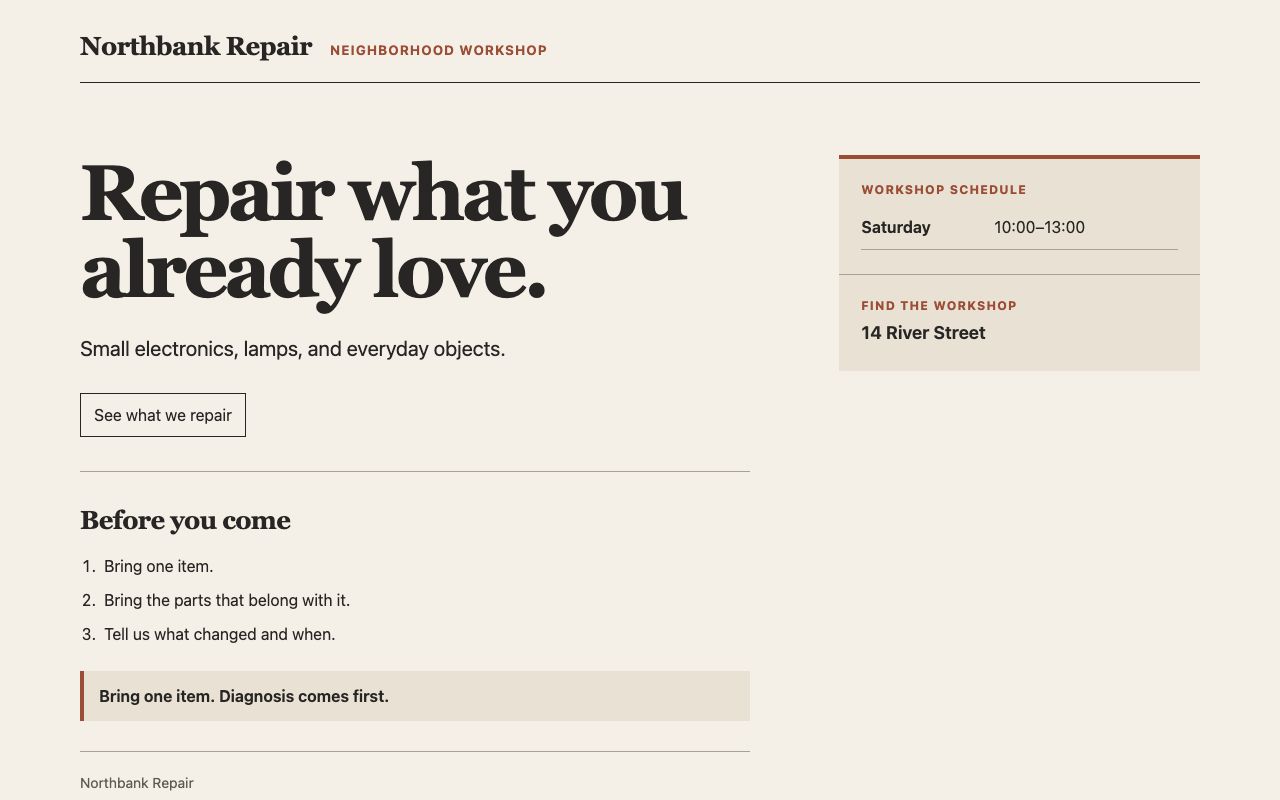
You are generating one raw AI Slop Lab experiment. You own ONLY [local output path redacted] You are not alone in the codebase. Do not revert or edit others' files. Generate the HTML from the task below in one pass. Use filesystem tools only to save this output. Do not browse, read unrelated files, install, run code, validate, revise, or optimize afterward. Preserve the first generated artifact. No additional files. Report completion with the path only.

Generate one complete, self-contained HTML document with inline CSS and JavaScript. Do not use external fonts, images, libraries, network requests, or inline event-handler attributes. Use semantic HTML, keyboard-operable controls, responsive layouts at 360 and 1280 pixels, visible focus, and prefers-reduced-motion support. All names and data below are fictional. Keep the same factual copy. Do not invent testimonials, metrics, awards, prices, or additional features. This is a visual prototype; label any unavailable action honestly.

Task: create a single-page site for Northbank Repair, a neighborhood repair workshop. Required copy: "Northbank Repair"; "Repair what you already love."; "Small electronics, lamps, and everyday objects."; "Saturday, 10:00–13:00"; "14 River Street"; "Bring one item. Diagnosis comes first." Include a clear "See what we repair" control revealing the three categories, a workshop schedule, and a short preparation checklist.
Visual direction: a neighborhood workshop noticeboard. Put practical time and location before decoration. Use a compact left-aligned masthead, a two-column editorial layout that stacks on mobile, system serif headings and system sans-serif body text, off-white paper, charcoal ink, one muted rust accent, thin rules, a simple item list, and a timetable. The visual hierarchy should make the time, address, and preparation order easy to scan. Explain state changes through labels rather than ornamental cards.
The right prompt specifies a noticeboard, scan order, left-aligned masthead, two-column editorial layout, paper/ink/rust tokens, thin rules, item list, and timetable.
The left output is a spacious workshop page with a rounded call-to-action. The right output places time and address in a structured timetable and uses thin rules and a compact masthead. Its timetable separates “Saturday” and “10:00–13:00”, so the exact required sentence “Saturday, 10:00–13:00” is not present as one string.
One first-pass output per condition. The direction changes palette, layout, hierarchy, and components together; it is not a controlled test. The successful delegated runs expose neither a backend model nor an accepted reasoning setting.
Motion
What changes when a three-step booking prototype is given explicit, task-focused motion constraints?
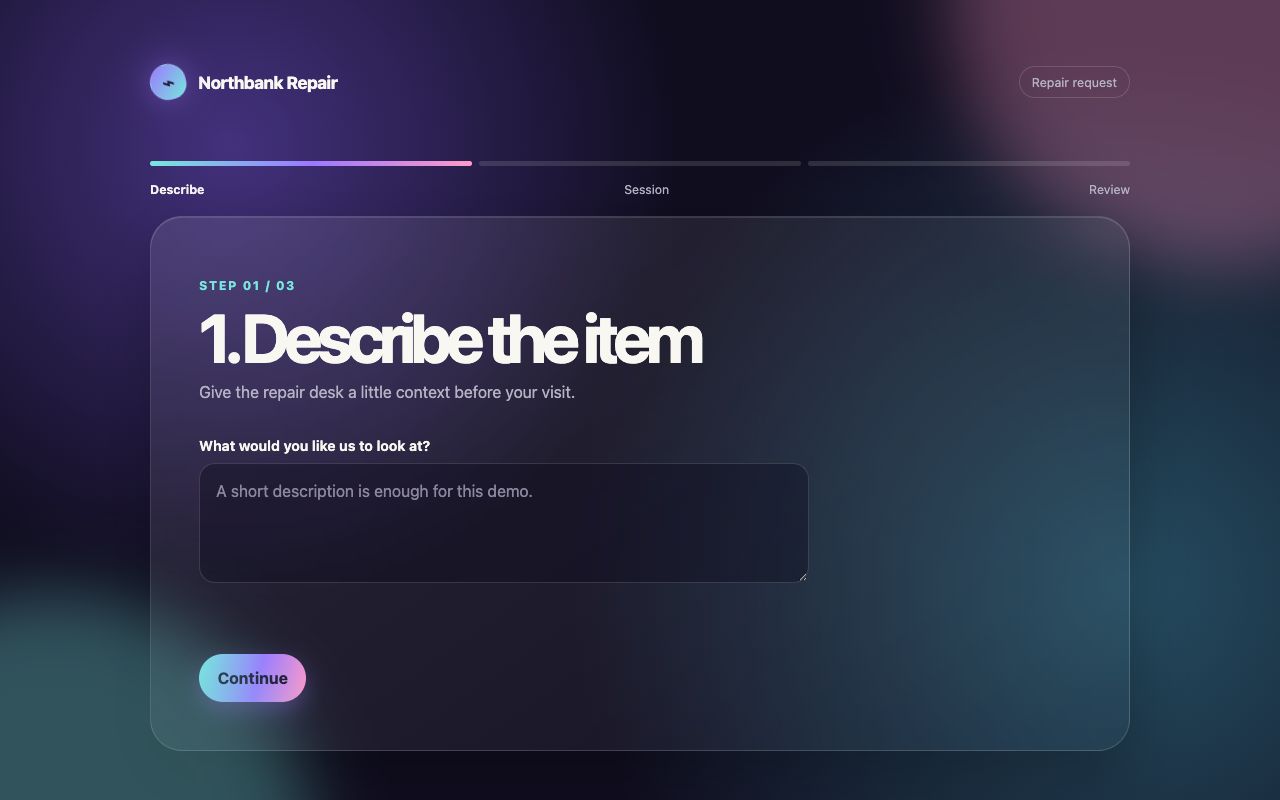
You are generating one raw AI Slop Lab experiment. You own ONLY [local output path redacted] You are not alone in the codebase. Do not revert or edit others' files. Generate the HTML from the task below in one pass. Use filesystem tools only to save this output. Do not browse, read unrelated files, install, run code, validate, revise, or optimize afterward. Preserve the first generated artifact. No additional files. Report completion with the path only.

Generate one complete, self-contained HTML document with inline CSS and JavaScript. Do not use external fonts, images, libraries, network requests, or inline event-handler attributes. Use semantic HTML, keyboard-operable controls, responsive layouts at 360 and 1280 pixels, visible focus, and prefers-reduced-motion support. All names and data below are fictional. Keep the same factual copy. Do not invent testimonials, metrics, awards, prices, or additional features. This is a visual prototype; label any unavailable action honestly.

Task: create an interactive three-step repair booking prototype. Required copy: "Northbank Repair"; "1. Describe the item"; "2. Choose a session"; "3. Review your request"; "Saturday, 10:00–13:00"; "Bring one item. Diagnosis comes first." The user can advance and go back. Submission is a demo and must be labeled "Demo only — no booking is sent." Use motion to connect state changes.
Visual direction: make the interface stylish with delightful smooth animations.
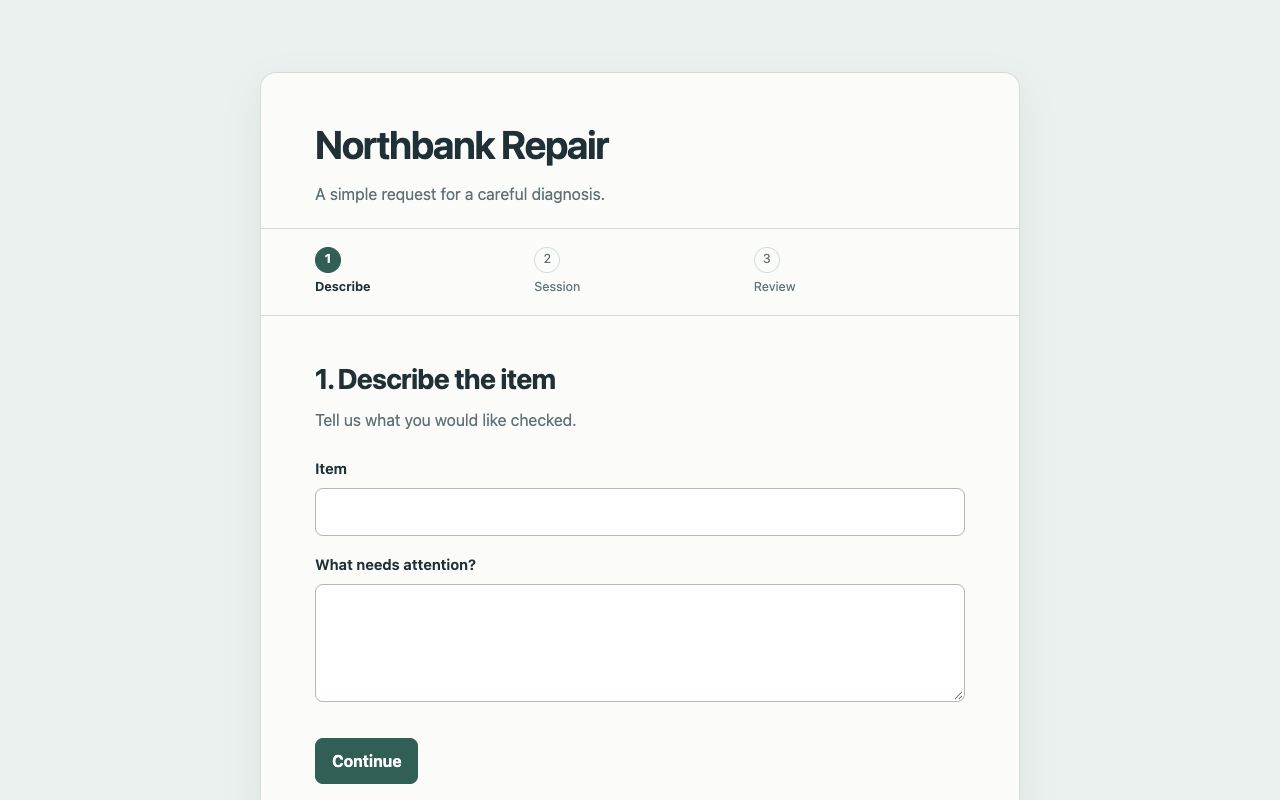
You are generating one raw AI Slop Lab experiment. You own ONLY [local output path redacted] You are not alone in the codebase. Do not revert or edit others' files. Generate the HTML from the task below in one pass. Use filesystem tools only to save this output. Do not browse, read unrelated files, install, run code, validate, revise, or optimize afterward. Preserve the first generated artifact. No additional files. Report completion with the path only.

Generate one complete, self-contained HTML document with inline CSS and JavaScript. Do not use external fonts, images, libraries, network requests, or inline event-handler attributes. Use semantic HTML, keyboard-operable controls, responsive layouts at 360 and 1280 pixels, visible focus, and prefers-reduced-motion support. All names and data below are fictional. Keep the same factual copy. Do not invent testimonials, metrics, awards, prices, or additional features. This is a visual prototype; label any unavailable action honestly.

Task: create an interactive three-step repair booking prototype. Required copy: "Northbank Repair"; "1. Describe the item"; "2. Choose a session"; "3. Review your request"; "Saturday, 10:00–13:00"; "Bring one item. Diagnosis comes first." The user can advance and go back. Submission is a demo and must be labeled "Demo only — no booking is sent." Use motion to connect state changes.
Visual direction: quiet task-focused motion. Animate only when the user changes a step. Keep the container height stable; transition outgoing and incoming contents with opacity and no more than 8px translation for 180ms, ease-out. Keep keyboard focus on the new step heading or first input, maintain entered values, preserve step status for assistive technology, and make reduced-motion transitions immediate. No entrance stagger, autoplay, looping, parallax, bounce, or animated background.
The right prompt limits step changes to 180ms opacity and ≤8px translation, requires focus and status handling, and forbids autoplay, looping, parallax, bounce, entrance staggers, and animated backgrounds.
The left output has blurred looping background shapes, gradients, and a declared 560ms panel entrance. The right output uses a declared 180ms opacity/8px transition only around step changes and moves focus to the new step heading. Both complete the demonstrated advance/back flow and show the no-booking notice.
One first-pass output per condition. The right prompt also changes visual layout and fields, so it is not a motion-only comparison. Declared CSS values and browser interaction were inspected; comfort, performance, contrast, and reduced-motion emulation were not measured. Backend model and accepted reasoning setting were not exposed.
Image
How does a product photograph change when the prompt names the object, composition, lighting, and exclusions?

Create a beautiful, premium editorial photograph of a handmade ceramic teapot on a table. Make it stylish, atmospheric, and visually striking. No text, no logo, no people. Landscape composition.
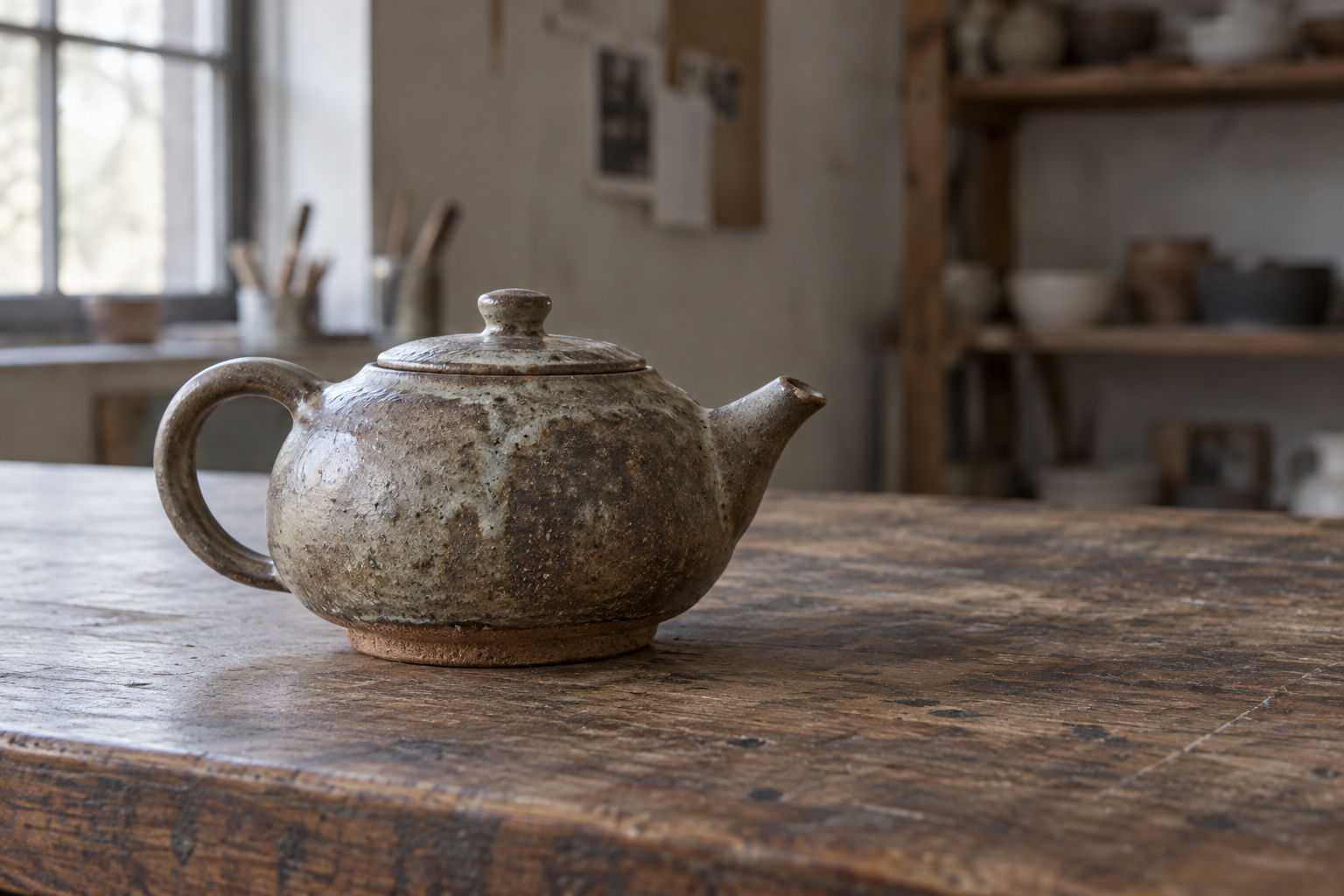
Create an editorial product photograph of a handmade ceramic teapot on a table. The subject is a squat iron-rich stoneware teapot with an unglazed foot, a slightly uneven matte ash glaze, one short spout and one sturdy loop handle. Place it off center on a worn walnut worktable, with its spout directed toward the empty right third. Use one large north-facing window from camera left: soft directional light, readable shadow, restrained highlights. The background is a real workshop wall kept out of focus. Frame the entire pot at tabletop height with a normal-lens perspective, a calm landscape composition, and modest depth of field so the lid, handle and spout remain readable. Keep the clay texture physically plausible; no invented distress, floating parts, duplicate handles, decorative props, text or logos. The photograph should communicate the object and its making rather than luxury spectacle.
The right prompt names the clay, glaze, foot, handle, spout direction, table, left-window light, background, camera height, lens perspective, depth of field, and prohibited props or parts.
The left output surrounds the pot with a vase, cup, cloth, tray, branches, and tea, and uses warm dramatic light. The right output shows one squat pot on a worn worktable with a workshop background and empty space to the right of its spout, without the added decorative props.
One output per condition. The image tool did not expose backend model, reasoning, seed, or quality settings. The longer right prompt changes many details, composition, and exclusions at once; this is descriptive, not causal.
Image
How does an illustration change when the prompt specifies an action, a print vocabulary, negative space, and exclusions?

Create a beautiful, modern, eye-catching illustration of a community repair workshop where two adult volunteers repair a table lamp. Poster composition, stylish colors, friendly atmosphere. No text, no logos.
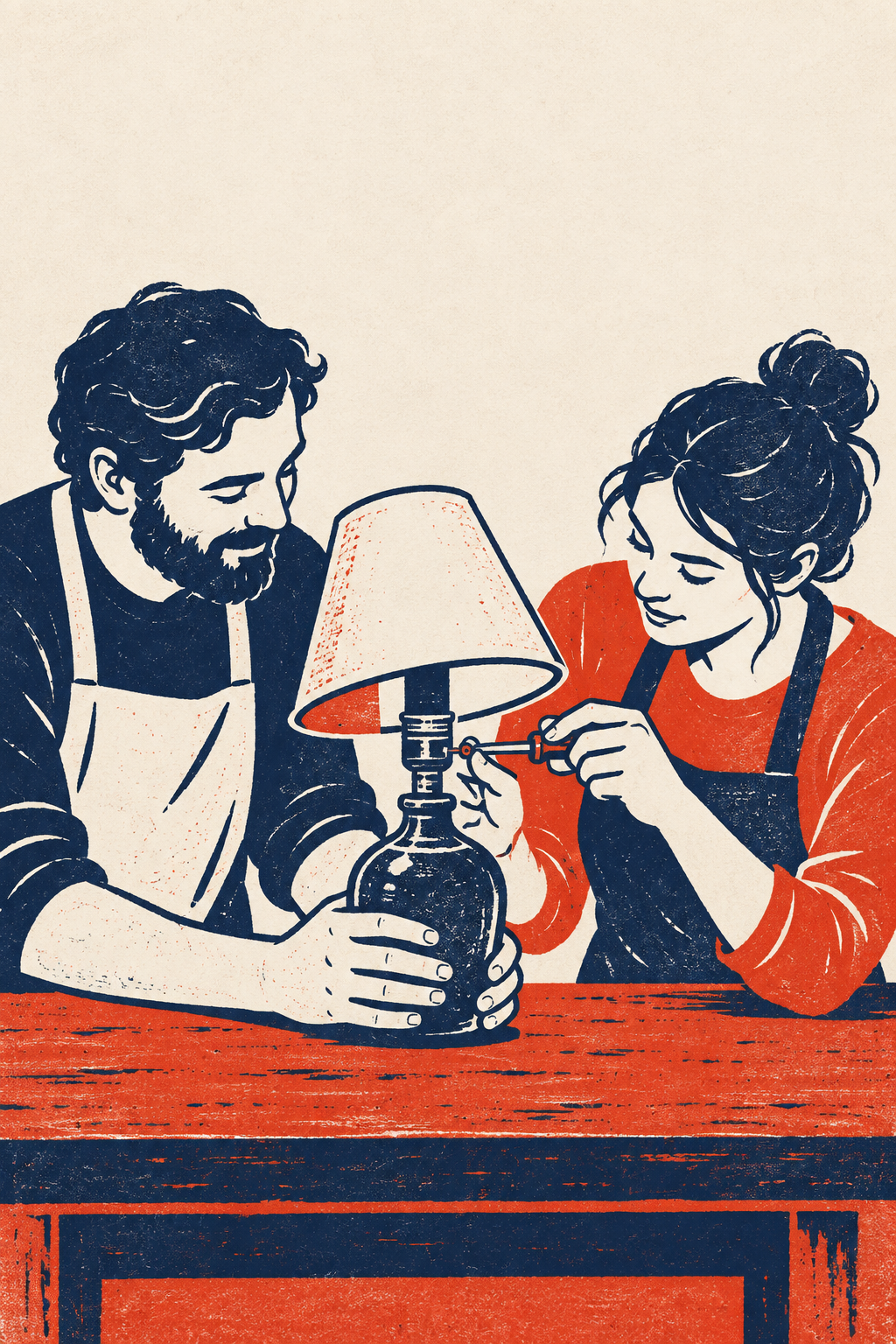
Create a portrait poster illustration for a community repair workshop. Show two adult volunteers repairing one unplugged table lamp at a single workbench: one person holds the base steady, the other checks a small screw with a hand tool. The shared lamp and the relationship between the two pairs of hands form the main focal point. Use a two-ink block-print vocabulary: deep navy and vermilion on uncoated paper, flat cut shapes, visible but restrained ink texture, simplified silhouettes, deliberately varied line weight, and a few large negative spaces. Keep the workbench in the lower half and a quiet empty upper third available for future typesetting. No text, logos, gradients, glow, 3D rendering, photorealistic faces, extra tools, duplicate lamps, or ornamental background shapes. Make the action understandable at thumbnail size; the poster should communicate cooperation and repair through its composition.
The right prompt specifies one unplugged lamp, two roles at one bench, navy and vermilion two-ink block print, a quiet upper third, and exclusions for extra tools, lamps, gradients, glow, 3D rendering, and ornamental backgrounds.
The left output is a detailed workshop scene with plants, tools, background people, a bicycle, and an additional lamp. The right output uses navy and vermilion print-like marks, two people, one lamp, and a quiet upper area; the requested upper third remains mostly open.
One output per condition. The image tool did not expose backend model, reasoning, seed, or quality settings. The directed prompt changes subject detail, style, composition, exclusions, and requests portrait framing while the baseline did not, so the output aspect ratios differ. This is descriptive, not causal.
Image
How does a ramen menu image change when the ingredients, framing, light, and exclusions are named?
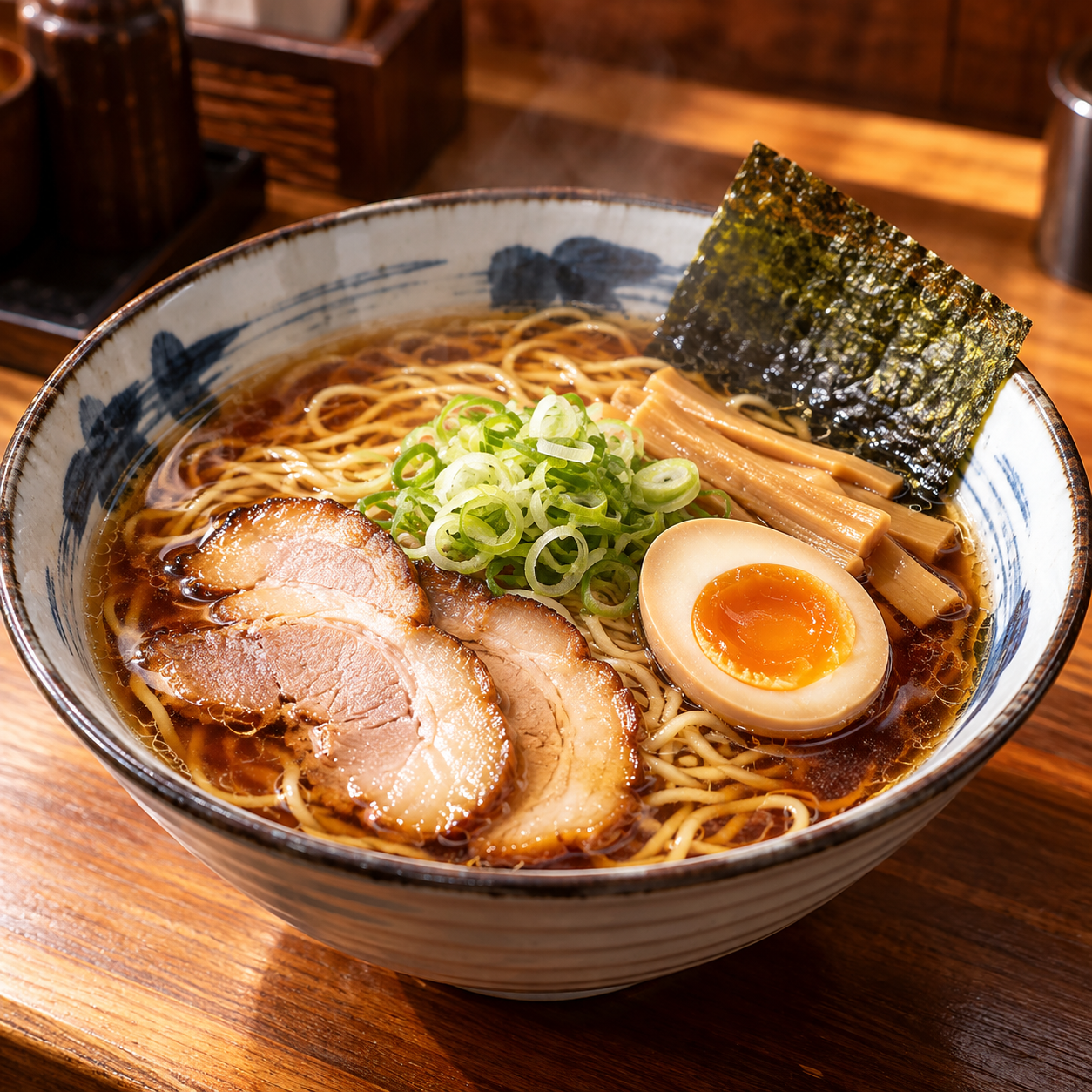
Generate one square 1024 by 1024 image. Create a beautiful, professional food photograph for a small ramen restaurant menu: one bowl of shoyu ramen on a wooden counter. Make it polished, vibrant, appetizing, and premium. No text, logos, or watermark.
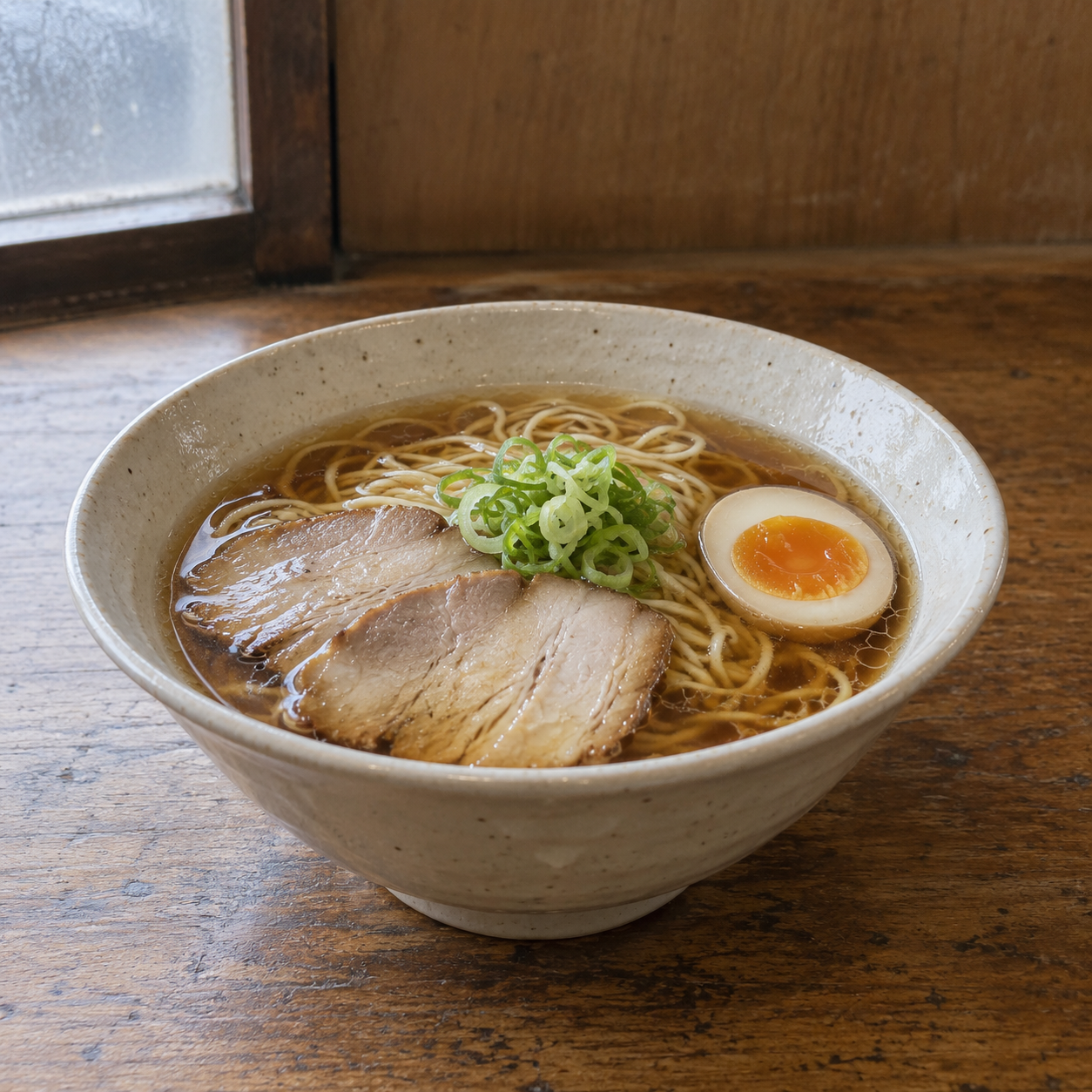
Generate one square 1024 by 1024 image. Photograph one ordinary 20 cm cream ceramic bowl of shoyu ramen on a worn oak counter for a small neighborhood restaurant menu. Clear brown broth, thin noodles, exactly two slices of pork, one halved egg, and a small cluster of scallion. Camera at diner eye level with a normal 50 mm perspective; the complete rim of the bowl stays in frame. A single cloudy window on the left gives neutral soft light. Show irregular ceramic glaze and ordinary real ingredient texture. Keep the rear counter quiet with no extra dishes or decorations. No exaggerated steam, floating ingredients, orange-teal grading, glossy advertising lighting, text, logos, or watermark.
The right prompt names the bowl, broth, noodles, ingredient counts, diner-eye-level 50 mm view, complete rim, window light, ordinary texture, and prohibited styling or props.
The left output is a close warm-lit bowl with a patterned rim, seaweed, bamboo shoots, and multiple pork slices. The right output shows a complete cream bowl in neutral light without background dishes or decorative props, but at least three distinct pork slices are visible although exactly two were requested.
One unedited output per condition. The longer right prompt changes several factors at once. Backend model, reasoning/effort, seed, and quality controls are unknown, so this is descriptive rather than causal.
Image
How does a lunar-station concept image change when the station layout, scale, material, palette, and exclusions are specified?

Generate one square 1024 by 1024 image. Create a beautiful futuristic concept-art scene of a small lunar research station at sunrise, with two habitat modules and one rover. Make it cinematic, epic, highly detailed, and visually impressive. No text, logos, or watermark.
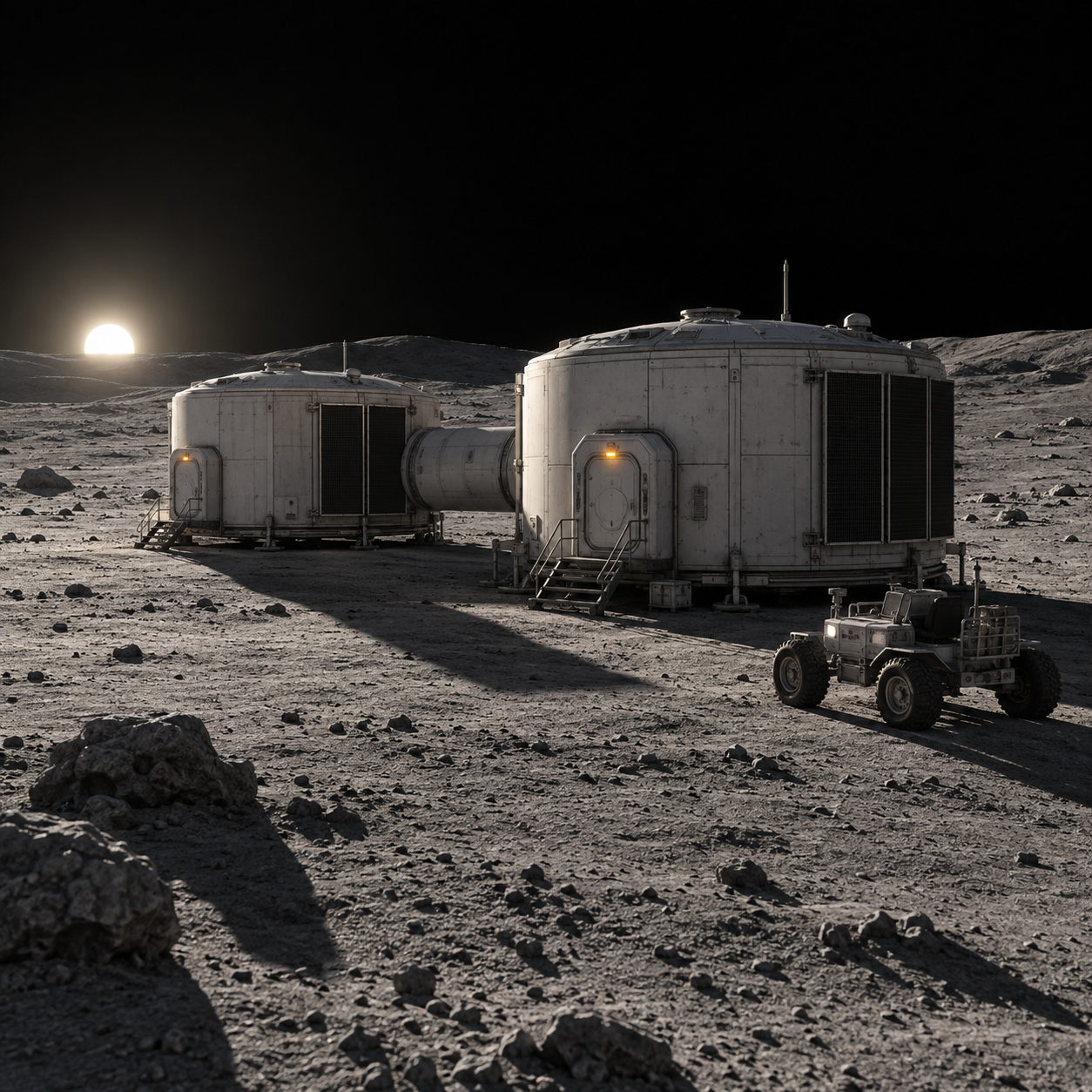
Generate one square 1024 by 1024 image. Create a restrained production-design concept-art view of a small lunar research station at sunrise. Exactly two low cylindrical habitat modules connect by one short tunnel, with one four-wheel utility rover parked beside the near module. Both modules have a pale ceramic outer shell, an airlock, and dark rectangular thermal radiators on their shaded side. View from a standing human height about 30 metres away, with a readable simple layout and consistent scale. Use flat black sky, dusty grey regolith, a low white sun, long hard shadows, and only a small amber airlock light as an accent. The design should be materially plausible rather than a futuristic city. No extra towers, crowds, giant planets, lens flares, neon, smoke, cinematic colour grading, text, logos, or watermark.
The right prompt fixes two connected modules, one four-wheel rover, shell and radiator details, standing-height distance, black sky, grey regolith, hard shadows, a small amber accent, and exclusions for spectacle.
The left output has a large Earth, bright horizon glow, detailed terrain, and illuminated modules. The right output shows two low modules joined by one tunnel, a single rover, black sky, long shadows, and small amber airlock lights; no giant planet, towers, crowds, or neon are visible.
One unedited output per condition. The right prompt changes layout, materials, palette, camera position, and exclusions together. Backend model, reasoning/effort, seed, and quality controls are unknown.
Image
How does a children's-story illustration change when its drawing vocabulary, composition, palette, and exclusions are named?
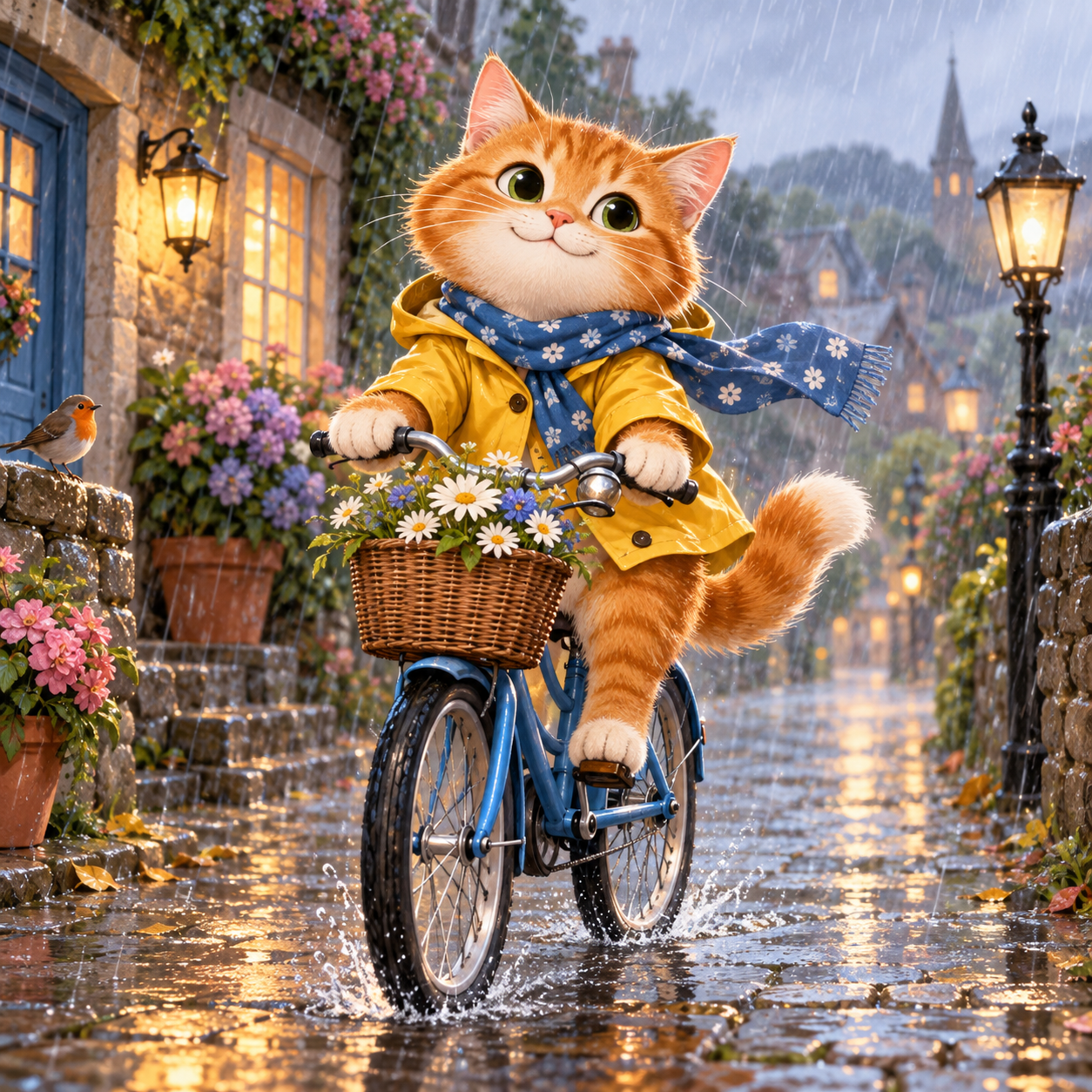
Generate one square 1024 by 1024 image. Create a beautiful charming illustration for a children's story showing one ginger cat riding a blue bicycle in gentle rain. Make it whimsical, polished, adorable, and full of character. No text, logos, or watermark.
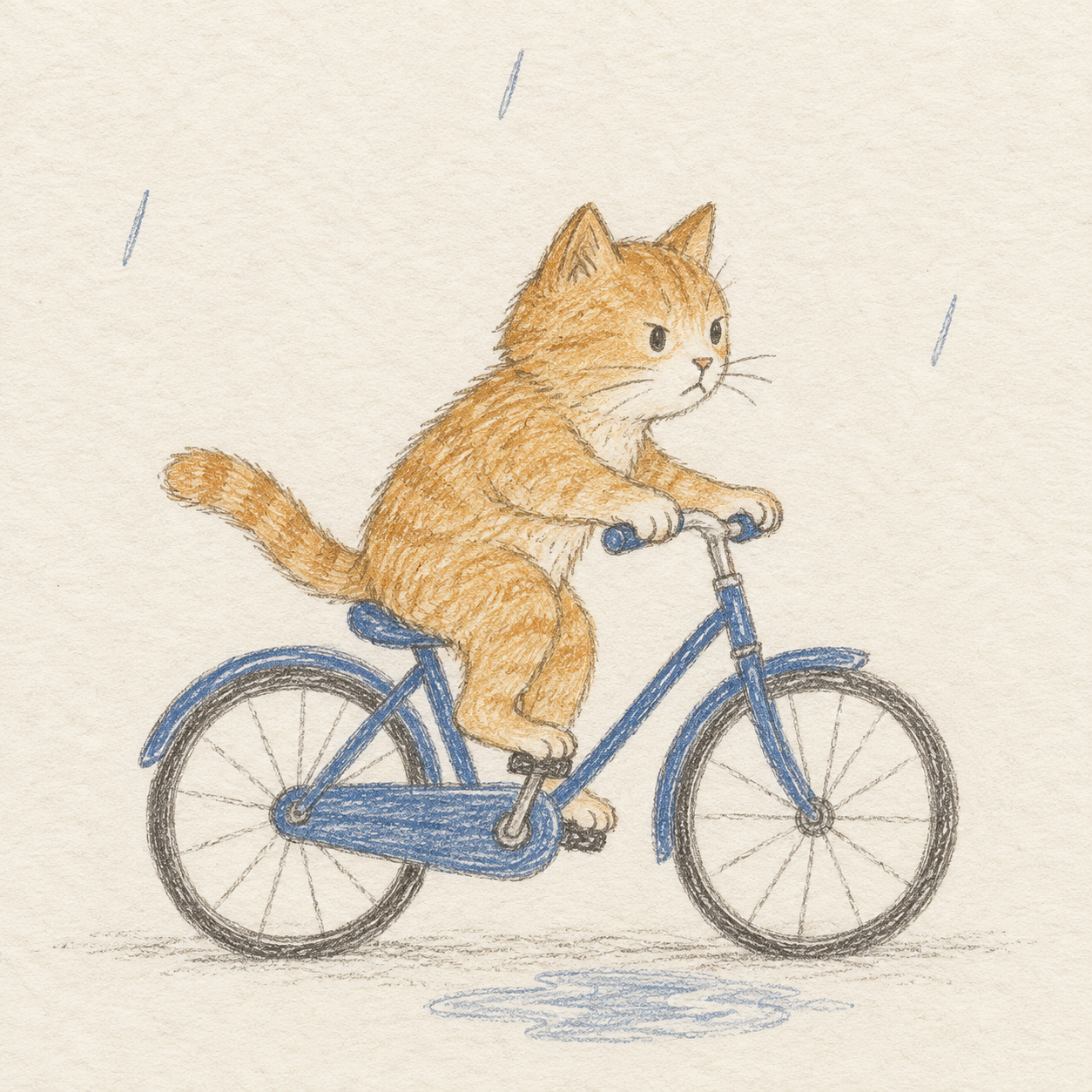
Generate one square 1024 by 1024 image. Illustrate one ginger cat riding one blue bicycle through gentle rain for a children's story. Use a handmade coloured-pencil drawing on off-white paper: broken pencil strokes, slightly uneven outlines, visible paper grain, and broad unfilled areas. The cat has a simple rounded head and a focused expression; both paws rest on the handlebars, the rear wheel is fully visible, and the bicycle stays recognisable. Place the cat and bicycle in the lower two thirds, with just three sparse rain marks above and one small puddle below. Limit colour to ochre for the cat, muted ultramarine for the bicycle, and warm graphite outlines. No other characters, props, umbrellas, flowers, buildings, shiny eyes, gradients, digital glow, 3D shading, text, logos, or watermark.
The right prompt specifies off-white paper, broken pencil strokes, open space, cat and bicycle placement, three rain marks, one puddle, a three-colour vocabulary, and exclusions for characters, props, glossy eyes, gradients, glow, and 3D shading.
The left output adds a raincoat, scarf, flower basket, bird, lamps, buildings, flowers, reflected light, and large glossy eyes. The right output uses visible pencil marks on off-white paper with broad blank areas, a ginger cat on a blue bicycle, three sparse rain marks, and one small puddle; no extra characters or props appear.
One unedited output per condition. The right prompt changes style, layout, palette, content limits, and negative constraints together. Backend model, reasoning/effort, seed, and quality controls are unknown.
Image
How does a workshop portrait change when the action, pose, light, texture, and background limits are specified?
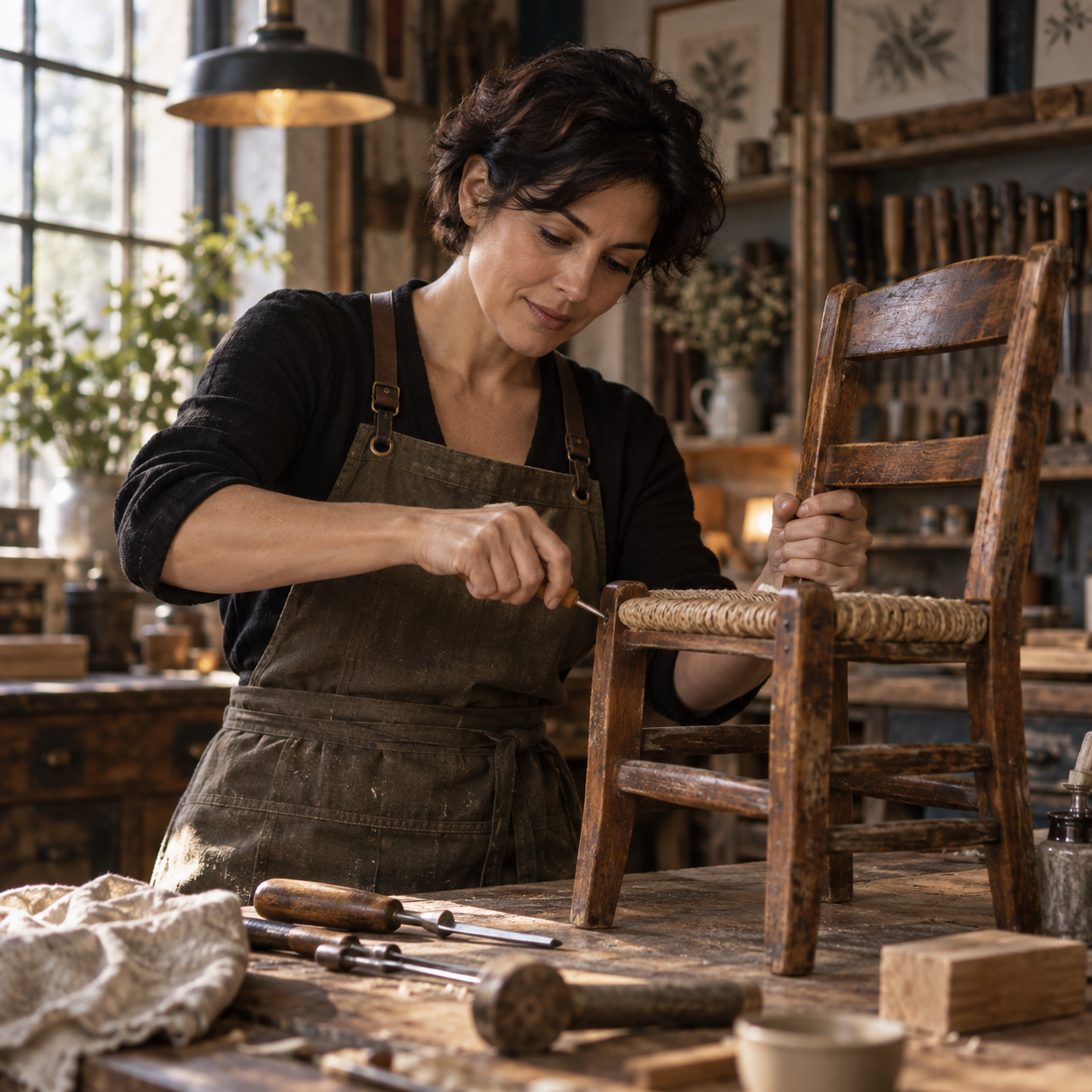
Generate one square 1024 by 1024 image. Create a beautiful professional editorial portrait of a fictional 40-year-old woman with short dark hair repairing a small wooden chair in a workshop. Make the scene elegant, polished, inspiring, and cinematic. No text, logos, or watermark.
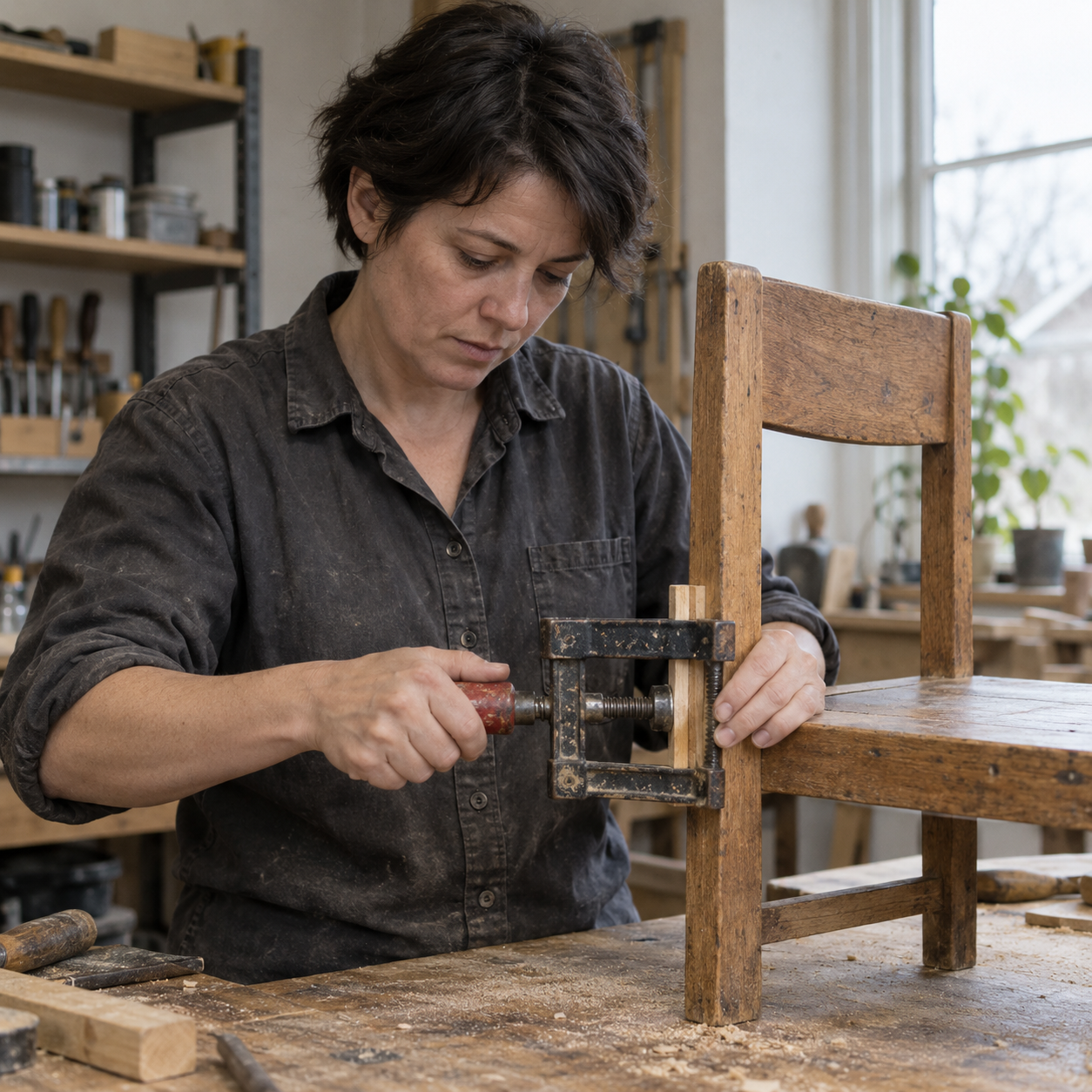
Generate one square 1024 by 1024 image. Create an observational editorial photograph of a fictional 40-year-old woman with short dark hair repairing a small wooden chair at an ordinary workshop bench. She wears a plain faded charcoal work shirt, looks down at the chair joint, and holds a small clamp with both hands in a physically plausible way. Frame waist-up from a normal eye-level 50 mm perspective, with the chair joint and both hands in focus. Soft overcast daylight enters from one window on the right. Preserve ordinary skin texture, slight sawdust on the bench, a scratched clamp, and one quiet out-of-focus shelf. Neutral white balance and modest contrast. No glamour retouching, smiling at the camera, dramatic rim lighting, exaggerated bokeh, orange-teal grading, extra people, extra hands, text, logos, or watermark.
The right prompt fixes the work shirt, downward gaze, two-handed clamp action, waist-up 50 mm view, right-window overcast light, ordinary texture, and exclusions for glamour treatment and cinematic styling.
The left output uses warm cinematic light, an apron, a decorative pendant lamp, soft background blur, and a detailed tool-filled workshop. The right output shows a faded charcoal shirt, downward gaze, a scratched clamp, both hands, neutral right-side daylight, and sawdust; tools remain visible on several shelf levels. The instruction "one quiet shelf" leaves the intended shelf count ambiguous.
One unedited output per condition. The right prompt changes pose, clothing, light, texture, composition, and exclusions together. Backend model, reasoning/effort, seed, and quality controls are unknown.
Web
What do the first outputs look like when gpt-6.1-sol receives the same brief with low and high reasoning?
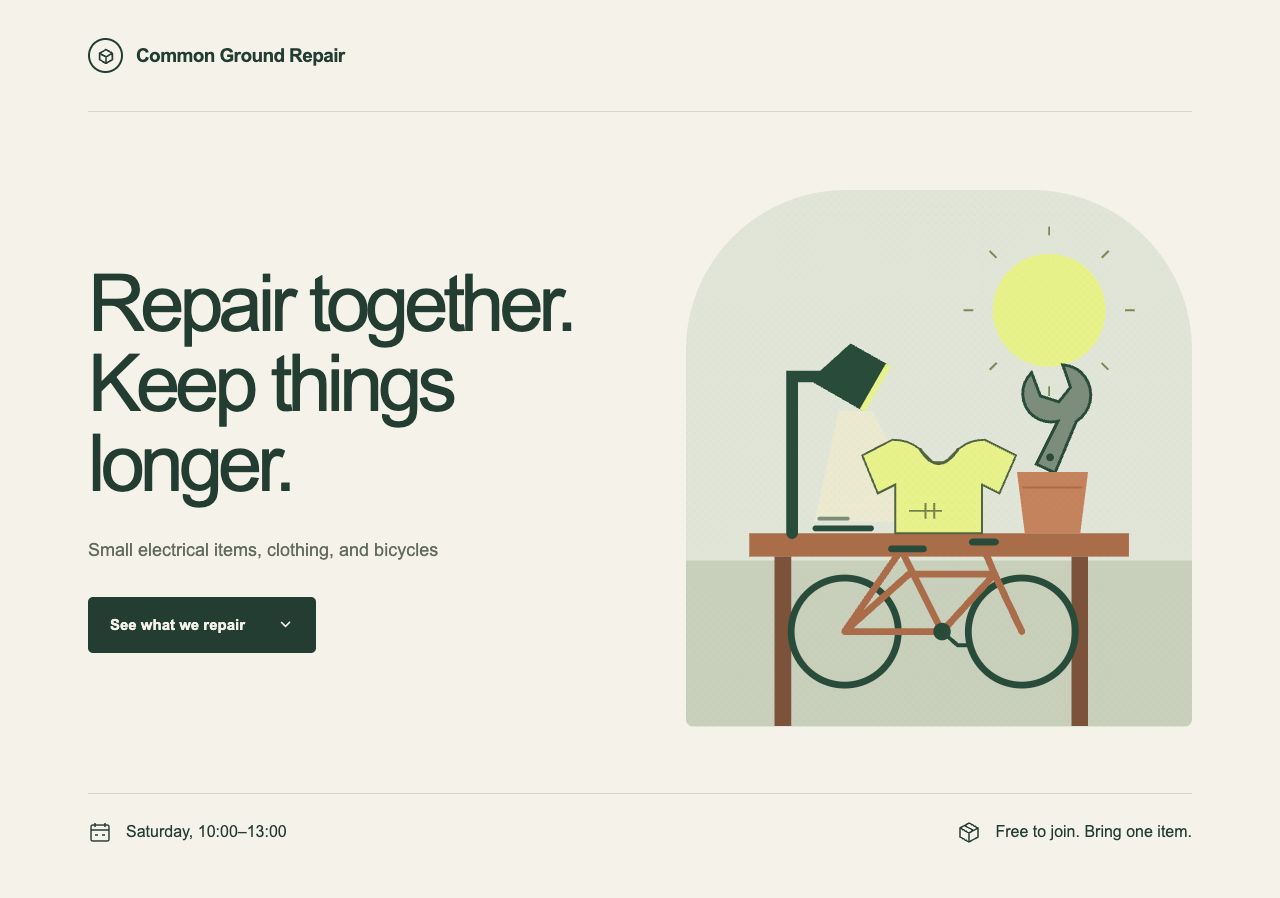
Return only one complete standalone HTML document beginning with <!doctype html>. Do not use tools, browse, read files, run code, or explain your choices. Use inline CSS and vanilla JavaScript only. No network resources, external fonts, or packages. Do not wrap the output in Markdown.

Create a responsive landing page for a fictional neighborhood repair workshop called Common Ground Repair. Make it modern, beautiful, and professional. Include exactly these English strings visibly in the page: "Common Ground Repair", "Repair together. Keep things longer.", "Saturday, 10:00–13:00", "Small electrical items, clothing, and bicycles", "Free to join. Bring one item.", and a button labeled "See what we repair". The button must toggle a visible list with exactly three categories: "Electrical", "Clothing", and "Bicycles". It must work with keyboard activation. Do not add accounts, payments, real booking submission, testimonials, or fabricated statistics. Let the design fit a 360px mobile viewport as well as desktop. The visible English copy must remain verbatim.
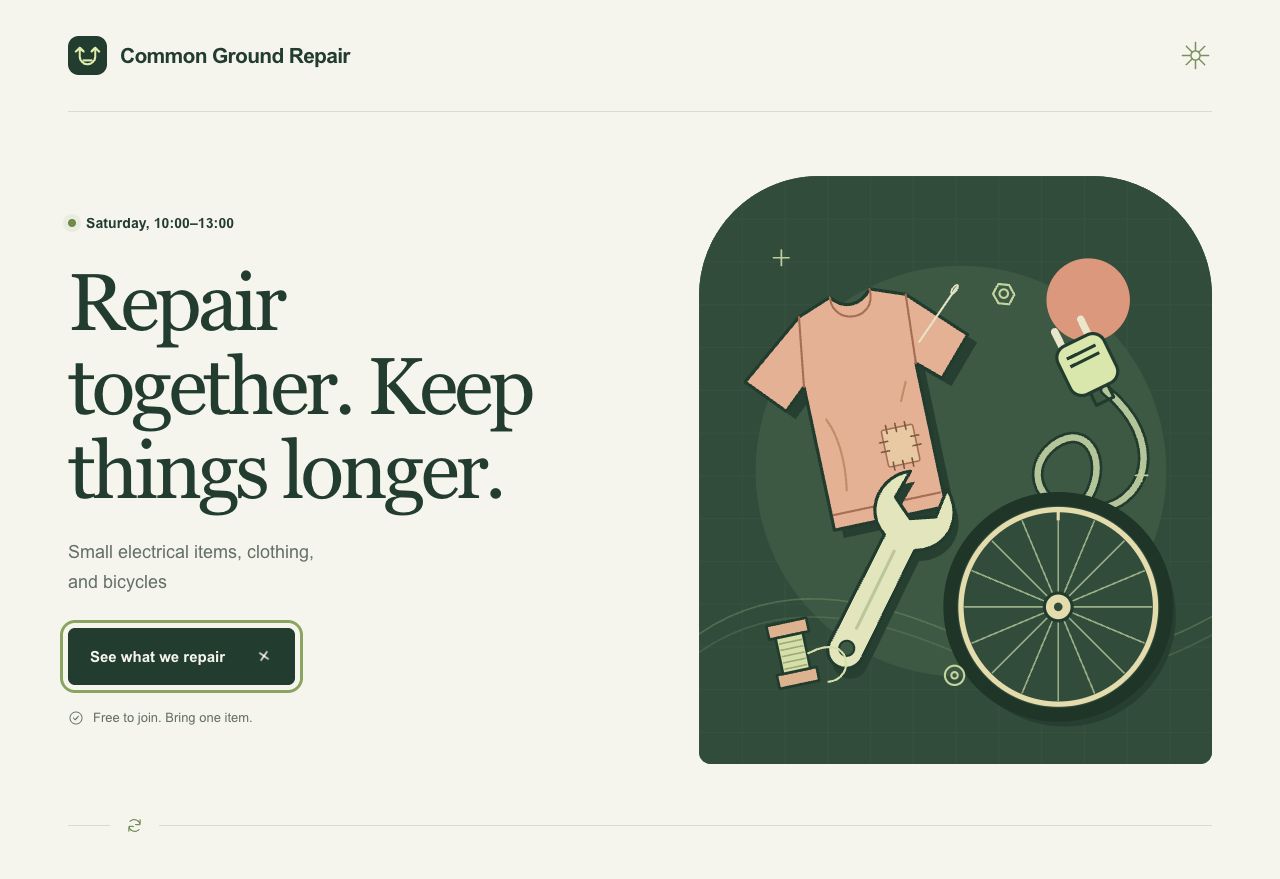
Return only one complete standalone HTML document beginning with <!doctype html>. Do not use tools, browse, read files, run code, or explain your choices. Use inline CSS and vanilla JavaScript only. No network resources, external fonts, or packages. Do not wrap the output in Markdown.

Create a responsive landing page for a fictional neighborhood repair workshop called Common Ground Repair. Make it modern, beautiful, and professional. Include exactly these English strings visibly in the page: "Common Ground Repair", "Repair together. Keep things longer.", "Saturday, 10:00–13:00", "Small electrical items, clothing, and bicycles", "Free to join. Bring one item.", and a button labeled "See what we repair". The button must toggle a visible list with exactly three categories: "Electrical", "Clothing", and "Bicycles". It must work with keyboard activation. Do not add accounts, payments, real booking submission, testimonials, or fabricated statistics. Let the design fit a 360px mobile viewport as well as desktop. The visible English copy must remain verbatim.
No prompt change: both submitted prompt files have exactly the same bytes. The requested reasoning effort changes from low to high; the requested model is gpt-6.1-sol for both.
Both source outputs preserve all six required visible-copy strings and include a tool-themed inline SVG scene and a native category toggle. The high output contains more SVG detail and more source text. These are first-output observations, not a quality score.
Model, prompt bytes, sandbox and tools instruction match, but each setting has one sample. Seeds, service snapshot and internal budget are unknown. Changing effort is explicit; the pair cannot establish a stable causal effect or ranking.
No cases match this domain.
Research design
Variable: “Make it premium/modern” versus audience, real copy, task, constraints, and acceptance checks.
Fixed: Model, reasoning, viewport set, implementation budget, and prompt length range; record length as a possible residual confound.
Measure: Task pass, invented-copy count, and blinded product-specificity rating.
Variable: Banned colors/fonts/layouts versus named visual goals, source palette, hierarchy, and interaction character.
Fixed: Same product facts, model, reasoning, assets, viewport, and token budget; prompt-length mismatch is logged.
Measure: Brief-fit checklist, reviewer explanation quality, and repeated-signature count across briefs.
Variable: Named information order, grid, content density, and responsive geometry versus none.
Fixed: Model, reasoning, copy, assets, viewport screenshots, and review time.
Measure: Overflow, collision, and order violations in desktop and mobile renders.
Variable: Type-role specification for label, title, body, and action versus generic typography request.
Fixed: Model, reasoning, copy length, viewport, color contrast target, and font availability.
Measure: Correct first-action identification, hierarchy rubric, and contrast/focus checks.
Variable: Verified product copy and data versus lorem-style placeholder content.
Fixed: Model, reasoning, art direction, layout brief, viewport, and build budget.
Measure: Copy-fit defects, meaningful action labels, and product-fact matching.
Variable: Own, labelled reference board versus text-only art direction.
Fixed: Model, reasoning, product facts, output size, permissions, and review rubric.
Measure: Reviewer identification of intended attributes, rights/provenance completeness, and clone-risk review.
Variable: Source-only review versus screenshot-informed critique and revision.
Fixed: Starting output, model, reasoning, iteration count, review time, and viewport set.
Measure: Resolved visual defects, task pass, and newly introduced defects.
Variable: One static anti-slop prompt versus brief-specific facts and selected direction across distinct tasks.
Fixed: Model, reasoning, number of briefs, output size, and sample count per brief.
Measure: Palette, layout, type, and component-signature repetition; product-fit remains separate.
Variable: Available low, medium, and high reasoning settings for the same prompt.
Fixed: Exact model identifier, prompt, tools, permissions, output size, task, and review protocol.
Measure: Task pass, blind preference, latency, iteration count, and accessibility checks reported separately.
Variable: Model identifier only, after matching what can be matched.
Fixed: Task, exact prompt, reasoning where equivalent, tools, permissions, output size, budget, and repetitions.
Measure: Task-pass and blind-preference distributions; unavailable controls remain null.
Variable: Raw brief versus compact map of facts, palette sources, type mood, interaction character, and prohibited imitation.
Fixed: Model, reasoning, content, assets, size, and evaluation prompt.
Measure: Invented claims, fact-match rate, and reviewer rationale grounded in supplied facts.
Variable: Baseline direction versus deliberately distinctive direction.
Fixed: Model, reasoning, product task, copy, viewport, and acceptance tests.
Measure: Keyboard path, focus visibility, contrast, responsive geometry, reduced-motion behavior, and task completion.
Variable: Orient/confirm/reveal motion versus visually similar decorative motion.
Fixed: Content, final state, component, model, reasoning, duration budget, and viewport.
Measure: Correct state recognition, task completion, and blind purpose identification.
Variable: Short, medium, and long durations within an accessible range.
Fixed: Same motion path, final state, easing, content, model, reasoning, and device conditions.
Measure: State-recognition time, interrupted interactions, and subjective discomfort kept separate.
Variable: Sequence-aligned stagger, arbitrary stagger, and immediate-render null.
Fixed: Content order, final layout, duration budget, model, reasoning, and viewport.
Measure: Correct reading-order identification and time to first intended action.
Variable: Spring, easing, and instant-state null.
Fixed: Distance, component, final state, duration budget, model, reasoning, and content.
Measure: Correct accepted/rejected-state recognition, task error, and motion-preference compatibility.
Variable: No-preference experience versus designed reduced-motion alternative.
Fixed: State changes, copy, task, model, reasoning, layout, and viewport.
Measure: Equivalent task completion and state recognition; no essential meaning exists only in movement.
Variable: Ambient/parallax loop on versus off.
Fixed: Page content, task, layout, device profile, model, reasoning, and observation time.
Measure: Comprehension, task completion, frame/performance trace, and discomfort report.
Variable: Framing, spatial relation, and focal hierarchy versus subject-only description.
Fixed: Model, reasoning if exposed, size, subject, light, material, batch size, and selection rule.
Measure: Pre-written composition checklist and blinded focal-point identification.
Variable: One lighting description or authored light diagram versus no lighting clause.
Fixed: Model, reasoning if exposed, size, subject, composition, material, and prompt length range.
Measure: Blinded mood match, focal clarity, and shadow/contact consistency checklist.
Variable: One material or making-process specification versus none.
Fixed: Model, reasoning if exposed, size, subject, composition, lighting, and batch size.
Measure: Correct material identification by blinded reviewers and artifact checklist.
Variable: Provider-supported low/default/high style-reference weight; null when unsupported.
Fixed: Exact model/version, reasoning if exposed, size, text prompt, reference, and batch size.
Measure: Content constraint pass and style-attribute consistency reported separately.
Variable: No reference versus one reference explicitly labelled as subject/identity/geometry where supported.
Fixed: Model/version, reasoning if exposed, size, text brief, reference rights context, and selection rule.
Measure: Attribute-specific pass rate, not a single resemblance score; retain rights and provenance review.
Variable: Supported negative-control clause versus positive specification; null when the provider exposes no negative control.
Fixed: Exact documented model/control, reasoning if exposed, size, subject, composition, and prompt-length budget.
Measure: Specified unwanted-attribute frequency, required-attribute pass rate, and collateral changes.
Variable: One changed clause per revision versus a multi-change revision.
Fixed: Model/version, reasoning if exposed, size, start prompt, reference set, batch size, and iteration budget.
Measure: Reviewer ability to attribute the observed delta and rate of unintended regressions.
Variable: Edit prompt with a listed preserve-set versus edit prompt without invariants.
Fixed: Model/version, reasoning if exposed, size, source image, requested edit, reference context, and batch size.
Measure: Requested-edit pass and preservation pass for each pre-registered invariant.
Variable: No text, short exact text, and post-composited text where task-appropriate.
Fixed: Model/version, reasoning if exposed, size, composition, lighting, material, and task.
Measure: Legibility, spelling accuracy, layout pass, and provenance disclosure of any post-edit.